

Asynchronous Architecture: A Beginner's Guide
Most slow, fragile backends share one root cause: they make the user wait for work that didn't need to happen right away. This guide walks you through asynchronous architecture from first principles — message queues, pub/sub, priority queues, acknowledgments, and dead-letter queues — and shows where RabbitMQ fits in. No prior experience required.
The Problem Nobody Warns You About
Imagine you've built a sign-up page. A user types their email, clicks Create Account, and your server springs into action. It saves the user to the database. Then it sends a welcome email. Then a verification email. Then it logs an analytics event. Then it pings billing to create a trial. Then, finally, it tells the user "You're in!"
On your laptop, with one user, this feels instant. In production — a thousand users a minute and an email provider having a slow day — it falls apart. The user stares at a spinner for eight seconds because your server is just waiting: waiting for the email API, the analytics service, the billing system. Worse, if any one of those services is down, the entire sign-up fails — even though the only thing that truly had to happen was saving the user.
This is the trap of synchronous architecture: every step runs in order, and each one blocks the next. Your code is only as fast as its slowest dependency and only as reliable as its flakiest one.
The fix is to change when work happens. That's what this article is about.
The Core Idea: Stop Doing, Start Delegating
Here's the mental shift. When a user signs up, the only thing that genuinely must happen right now is saving their account. Everything else — emails, analytics, billing — matters, but none of it needs to finish before you tell the user "welcome."
So instead of doing all that work up front, the sign-up service simply announces what happened: "Hey, a user just signed up." Then it responds to the user immediately. Other parts of the system pick up that announcement and do their jobs on their own time.
That's asynchronous architecture, and the announcement-passing runs through a message queue. Let's build the vocabulary one piece at a time.
Message Queues: The To-Do List Between Services
A queue is exactly what it sounds like — a line. Messages enter at one end and leave at the other, usually in first-in-first-out (FIFO) order, like people queuing for coffee.
The real power of a queue is that it decouples the thing producing work from the thing doing it. The sign-up service drops a message into the queue and walks away — it doesn't care who picks it up or when. A separate worker reads from the queue and does the actual job.
Why does this matter?
- Speed: The sign-up service responds instantly, because dropping a message takes milliseconds.
- Resilience: If the email worker is down, messages safely pile up in the queue and get processed when it recovers. Nothing is lost.
- Smoothing spikes: If 10,000 sign-ups hit at once, the queue absorbs the flood and workers chew through it at a steady pace — instead of everything crashing together.
These two roles have names: the producer puts messages in, and the consumer takes them out.
Producers and Consumers: Two Sides of the Conveyor Belt
Picture a sushi restaurant with a conveyor belt. The chef (the producer) places plates on the belt without knowing or caring who will eat them. Diners (the consumers) take plates as they come around.
That separation is the heart of the pattern:
- The producer only knows how to create and publish a message. It has no idea how the work gets done.
- The consumer only knows how to receive and process a message. It has no idea who created it.
The payoff: you can add ten more chefs or ten more diners without either side knowing about the other. In software terms, if your email queue is backing up, you spin up more consumer instances — say, on Kubernetes — and they all pull from the same queue, sharing the load. The queue hands the next message to whichever consumer is free. You scale the slow part without touching anything else.
Pub/Sub: When One Event Concerns Many
Our sign-up doesn't need just one thing to happen — it needs a welcome email, and a verification email, and an analytics event. One event, several independent reactions.
A plain queue assumes one message goes to one consumer. But here we want one event to reach everyone who cares. That's the publish/subscribe (pub/sub) pattern.
In pub/sub, the producer publishes to a central hub — often called an exchange or topic — and any number of subscribers register their interest. The hub copies the message to every interested subscriber. When everyone gets a copy, that total broadcast is called fanout.
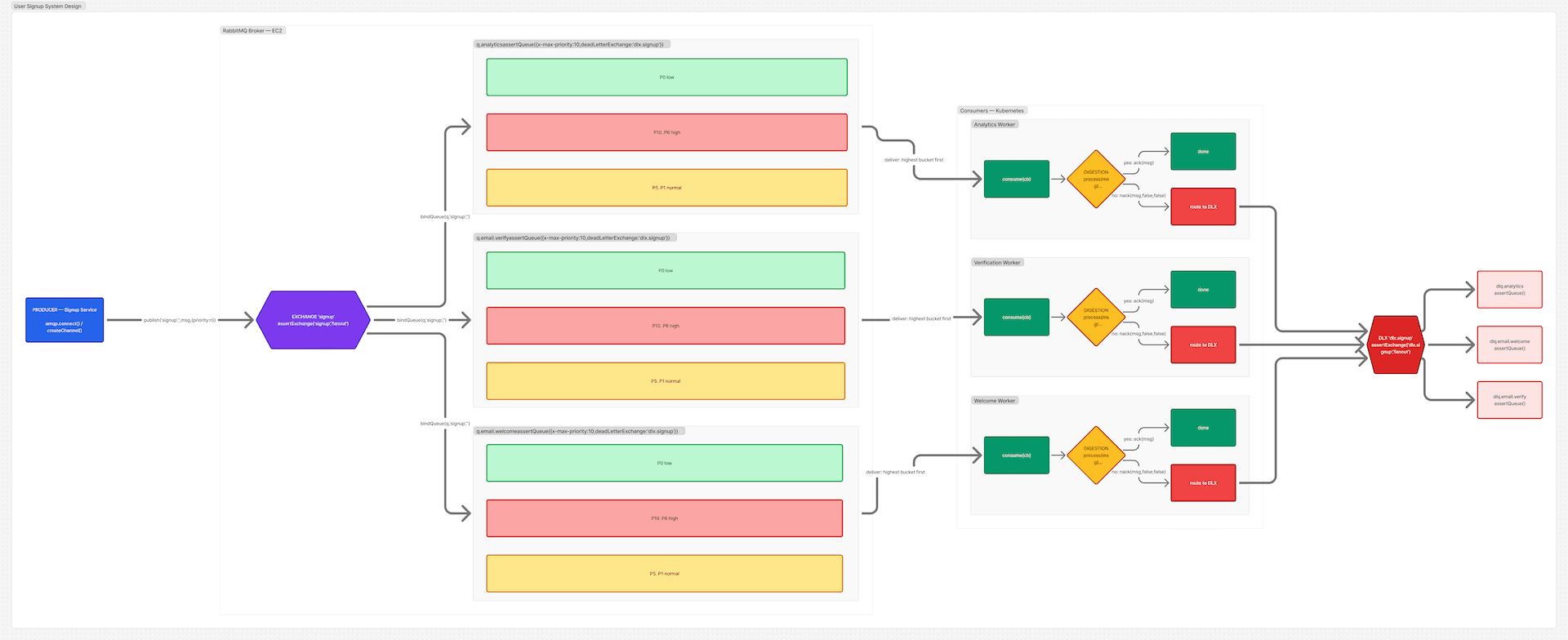
So our sign-up service publishes a single user.signed_up event. The welcome-email service, the verification service, and the analytics service have each subscribed. Each gets its own copy in its own queue and processes it independently. The sign-up service still has no idea any of them exist — it just shouts the news once.
Here's the distinction worth internalizing:
- A queue is a work line — one message, handled once, by one of possibly many competing workers.
- Pub/sub is a broadcast — one event, copied to many independent subscribers.
Real systems combine both: an event fans out to several queues, and each queue may have a pool of competing consumers behind it.
Routing: Not Everyone Needs Everything
Fanout (everyone gets a copy) is one extreme. Precise targeting is the other. Sometimes you want a message to reach specific queues based on a label.
That's the job of a routing key. The producer tags each message with a key, and the hub uses that key to decide which queues receive it. A message tagged email.welcome goes to the welcome queue; email.password_reset goes elsewhere. The hub becomes a smart switchboard rather than a megaphone.
Pick the routing style to fit the need: fanout when truly everyone cares, keyed routing when different messages belong to different handlers.
Priority Queues: When Some Work Can't Wait in Line
Plain FIFO is fair but naive. Picture the verification-email queue during a traffic spike: it's clogged with thousands of routine messages. Now a password reset arrives — something the user is actively waiting for, staring at their screen. Should it really wait behind 9,000 marketing emails?
A priority queue solves this. Each message carries a priority number, and higher-priority messages jump ahead of lower-priority ones regardless of arrival order. The password reset (priority 10) leaps to the front; the routine welcome email (priority 1) waits its turn.
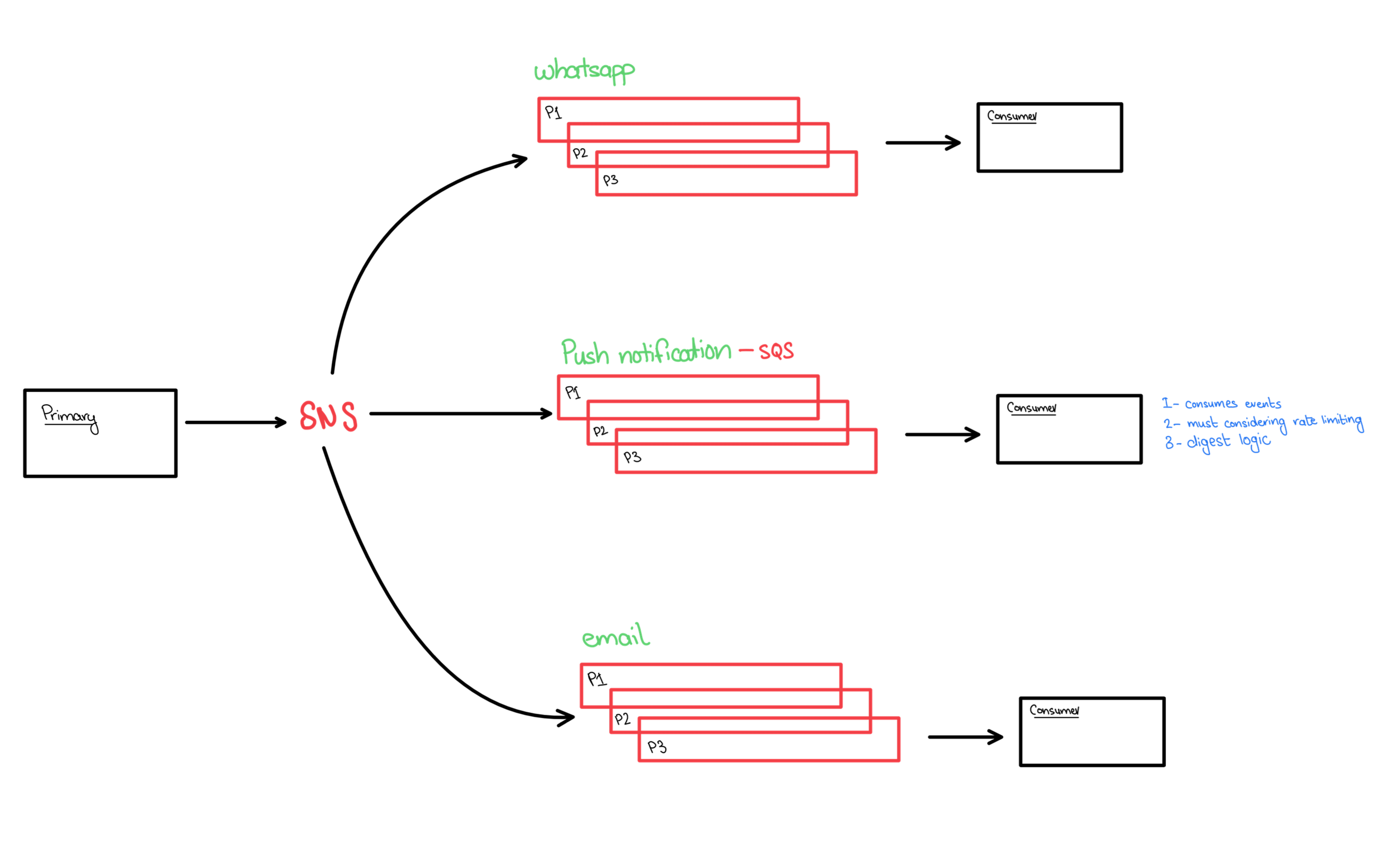
Under the hood, a broker typically keeps the queue sorted into priority levels — internally it maintains a separate sub-line for each priority value in use, and always serves the highest non-empty one first. Within a single priority level, ordering stays FIFO. (A practical caution: cap the number of priority levels low — often ten or fewer — because each level costs memory.)
The lesson: not all work is equally urgent, and priority queues let your architecture reflect that.
Digestion Logic: What a Worker Actually Does With a Message
So far we've moved messages around. But what does a consumer do with one? This processing step — call it the digestion logic — is where the real care lives, because work can fail.
A robust consumer follows a clear contract:
- Receive the message (subscribe and get handed the next item).
- Process it — send the email, write the record, call the API.
- Acknowledge the outcome. This is the critical step. The consumer tells the broker either "I succeeded — you can delete this message" (an ack) or "I failed — don't just throw it away" (a nack or reject).
That acknowledgment step is what makes queues trustworthy. A message isn't removed the instant a worker grabs it — only once the worker confirms success. If a consumer crashes mid-process before acknowledging, the broker notices and redelivers the message to another worker. Nothing silently vanishes.
But this raises a question: what about messages that fail every time? A malformed email address, a corrupt payload — retrying forever just clogs the system. We need somewhere for the failures to go.
Dead-Letter Queues: A Hospital for Sick Messages
A dead-letter queue (DLQ) is a separate queue where problem messages go to rest instead of looping forever.
A message gets "dead-lettered" when something goes wrong:
- A consumer rejects it without asking for a retry (it's permanently broken).
- It's been retried too many times and keeps failing.
- It sat in the queue so long it expired (exceeded its time-to-live).
Rather than vanishing or jamming the main queue, the message is rerouted — usually via a dedicated dead-letter exchange — into the DLQ. There, engineers can inspect it later: Why did this fail? Is there a bug? Bad data? The DLQ is your safety net and your debugging trail rolled into one. A pipeline without a DLQ silently loses data — the kind of bug you discover months too late.
A production-grade setup usually adds a retry count, so a message is attempted a few times — surviving brief network blips — before it's finally dead-lettered for human review.
Putting It All Together: The Sign-Up, the Right Way
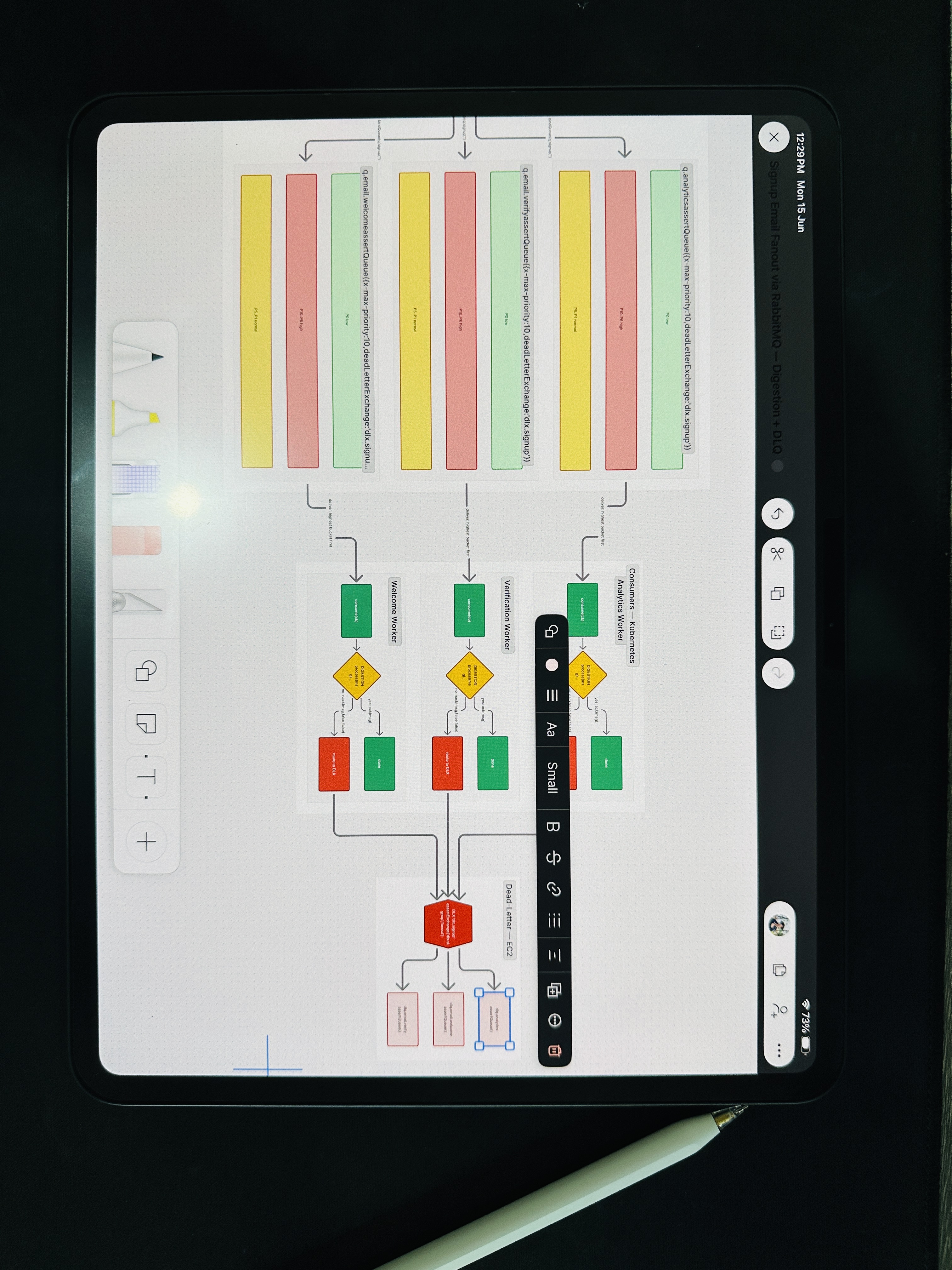
Let's replay our sign-up with everything we've learned:
- A user signs up. The sign-up service saves the account, publishes a single
user.signed_upevent to an exchange, and immediately responds "Welcome!" The user waits milliseconds, not seconds. - The exchange fans out that event into three independent queues: welcome email, verification email, and analytics.
- Each queue feeds a pool of consumers running on Kubernetes, scaled to its own load. The verification queue, being busiest, runs the most workers.
- Each queue is a priority queue, so urgent verification messages outrank routine ones.
- Each consumer runs its digestion logic: process, then
ackon success ornackon failure. - Messages that fail repeatedly are routed to a dead-letter queue per service, where they wait for inspection instead of disappearing.
The result is a system that's fast (the user never waits on slow side-tasks), resilient (a downed email service doesn't break sign-up), scalable (each piece scales independently), and observable (failures are captured, not lost).
Where RabbitMQ Fits In
You could, in theory, build all of this yourself. You shouldn't. This is solved infrastructure, and the most popular open-source solution is RabbitMQ — a battle-tested message broker that provides every concept above out of the box.
RabbitMQ gives you:
- Exchanges for routing — fanout for broadcasts, direct and topic exchanges for keyed routing.
- Queues with durable storage, so messages survive restarts.
- Priority queues via a simple
x-max-prioritysetting on the queue. - Acknowledgments built into the protocol, so the ack/nack contract just works.
- Dead-letter exchanges, configured per queue, to catch failures automatically.
- Fair distribution across competing consumers, so a pool of workers shares load cleanly.
It speaks a standard protocol (AMQP), runs comfortably on a single server or a clustered set of nodes for high availability, and has client libraries for essentially every language.
How does it compare to the alternatives? Each shines in a different niche:
- Apache Kafka — massive event-streaming and replayable logs.
- AWS SQS/SNS — fully managed, cloud-native queues.
- Redis — lightweight in-memory queuing.
RabbitMQ remains a superb default when you want rich routing, priorities, and reliability without managing a heavyweight streaming platform.
The Takeaway
The journey from "do everything now" to "announce it and move on" is one of the most important leaps in [backend](/services/backend-devops) engineering. Asynchronous architecture isn't about doing less work — it's about doing work at the right time, in the right order of urgency, with a safety net underneath.
Queues decouple. Pub/sub broadcasts. Priorities triage. Acknowledgments guarantee. Dead-letter queues catch what breaks. And tools like RabbitMQ hand you all of it, ready to use.
Your app can finally stop waiting.
Ready to transform your business?
Looking to implement this in your business? Explore our Backend & DevOps to build production-ready solutions.
Explore Our Services